I’ve just deployed an update to the Numbas editor which makes searching a bit easier, and gives everyone a user profile.
I’ve replaced the old question/exam index pages with a new system which is a lot quicker when the database contains a lot of items (for example, the mathcentre database, which currently contains over 600 questions).
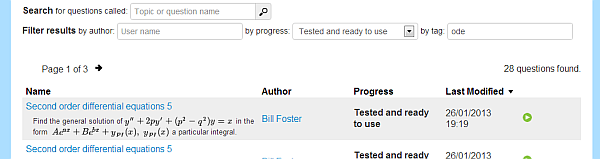
It’s now possible to filter questions by tag, which should make organising and finding questions you’re working on a bit easier. The tags on the question editing page are now clickable, so you can easily find related questions.
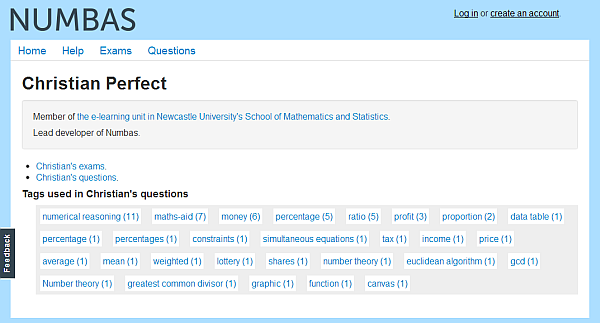
Every user has a profile page where they can provide a bio, along with links to their exams, questions, and the tags they’ve used. You can edit your bio by clicking on the “edit your profile” link on your profile page.
Thanks to Joshua Beals for giving me a prod to sort out the searching interface – it was beginning to creak a bit!
You can try out the new features at the mathcentre Numbas editor.
Many people have asked for the ability to hide questions from public view, and to share editing privileges with their colleagues. I spent last week implementing sharing and access controls on both exams and questions in the Numbas editor.
To define who can see and edit your questions, click on the Access tab on their edit pages. For an explanation of the various settings, see the Numbas documentation.
We’ve finally put a news item on the mathcentre front page that the Numbas editor is available for anyone to use. We’ve uploaded over 300 of our own questions to the database for you to pick and choose from, or you can create your own questions using the browser-based editor.
If you just want to run some questions for revision, we’ve put some tests on a few first-year maths topics to Numbas in the main mathcentre database; you can find them by searching for “Numbas” at mathcentre.ac.uk.
Over the Summer we had a project, funded through HESTEM, to put Numbas material and the new editor on Loughborough University’s excellent mathcentre site.
We’ve run quite a bit behind schedule for various reasons but we now have some material on the site for students to use, and a fully functional question editor for teachers, stocked up with over 300 questions from our database developed over the past few years here at Newcastle.
The tests for students are available under the “Test Yourself” header for a few topics. For example, this test on completing the square allows students to try randomly generated questions on the same subject over and over until they feel happy with it. This is exactly the kind of thing e-assessment is good at: repetitive practice at basic skills at the student’s pace.
The Numbas editor is a much bigger deal. It’s online at numbas.mathcentre.ac.uk. It allows a few levels of interaction:
- Anyone can browse the database of questions and tests on the site, and download packages for uploading to VLEs or wherever.
- If you create an account on the site, you can select questions to make into exams suited for your particular needs, or…
- You can write your own questions, using the same tools we use to make our highly successful in-course assessments.
We’re still working on the documentation, and the interface is still being tweaked, but we think that the material and tools we’re making available will be of real use to both students and teachers. If you’ve got any questions, please write a comment here or send an email to numbas@ncl.ac.uk.
I’ve just added support for matrices and vectors to Numbas’ JME system. You can now do some very simple linear algebra calculations. This is mainly useful for generating question statements.
For more information, have a look at the relevant commit message.
I’ve just released v1.4 of Numbas on Github. I increase the version number whenever there are significant additions to the system, and there are loads this time.
Here’s what’s changed since v1.3: Read the rest
Numbas, my web-based e-assessment system, is now available under an Apache 2.0 licence at github. That means it’s finally properly open-source, and anyone can do whatever they like with it.