We’ve got a pretty big new feature for Numbas this week – a whole new part type! The matrix entry part asks the student to enter a matrix.
In the past, we’ve hacked together questions where we ask the student to enter a matrix by putting a load of gapfills in a table. That was very laborious to set up, and the user experience for the student wasn’t particularly great.
The matrix entry part is meant to make all this a lot smoother – you give a JME matrix variable as the correct answer, and the student is shown a (optionally resizable) grid of cells to enter their answer.
It works like this:
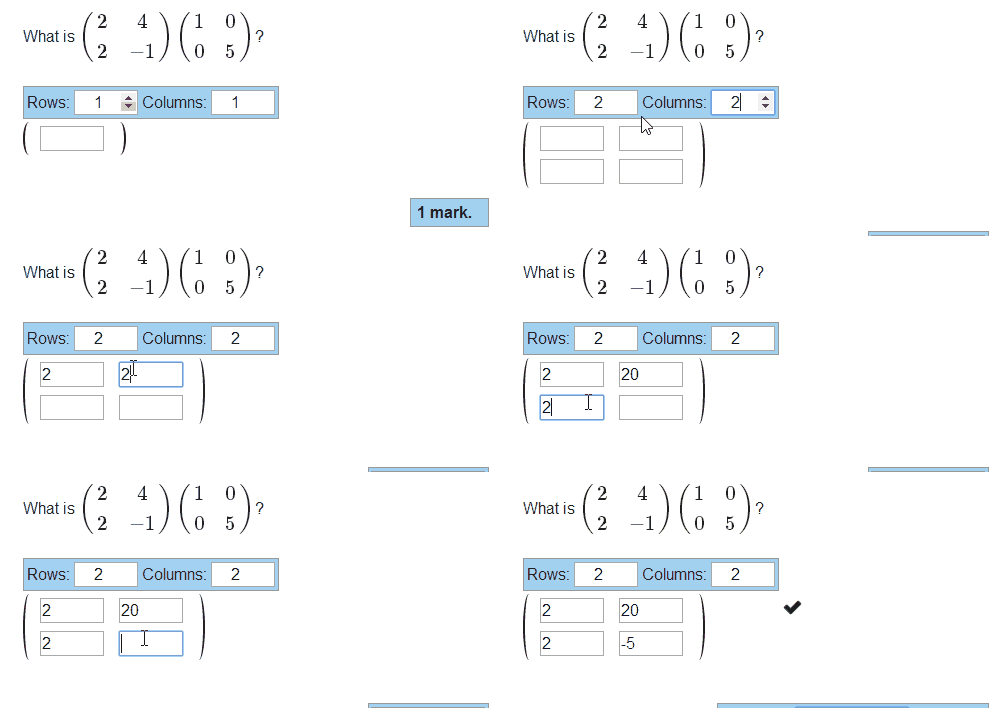
The student picks the size of their answer, then enters numbers in each of the cells. It’s marked as correct if the matrix they give exactly matches the one you give.
If you want, you can lock the size of the answer matrix, so the student doesn’t have to be shown the size picker interface. That looks like this: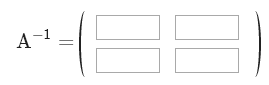
There are a few other options:
- You can award the marks proportionate to the number of correct cells, instead of a simple pass/fail.
- You can mark cells as correct if they’re within a given margin of error of the correct answer.
- The precision restriction options from the number entry part are also available here.
- You can allow the student to enter their answers as fractions (this is also available for number entry parts now)
You can see all that in action in this demo exam I created, containing a few simple-ish matrix entry questions. And of course, there’s documentation.
One thing that many people have asked for over the years is the ability to check whether the variables generated by a question have a desired property, and “re-roll” them if not. I’ve been reluctant to implement this because it can lead to sloppy question design when a method that’s guaranteed to work can often be found with a little bit of thinking.
Read the rest
Here’s another round-up of recent development work on Numbas.
Version tracking
The big new feature is version tracking – every change made to a Numbas question or exam is saved in the database, and you can revert to old versions in the new “Editing history” tab. Read the rest
Here’s another round-up of the development work on Numbas in the past month-and-a-bit.
A little attribution
I’ve added a small attribution footer to the bottom of the default theme. It looks like this:

Now that people can upload their own themes, we wanted an unobtrusive way of noting that tests are built using Numbas. If you don’t want it there, you can use a modified theme to remove it, but we’d prefer you kept it. Read the rest
On small screens (tablets and phones, mainly), the default Numbas theme didn’t used to leave much space for the question content.
I’ve spent the past couple of days making the theme responsive, so screens less than 980px wide switch to a more vertical layout. The question menu and pause/end buttons move beneath the content area, and the banner is more vertical too. This means the content area can have the full width of the page. Read the rest
A couple of weeks ago I made it possible to upload your own themes to the editor, so it makes sense to also allow you to upload your own extensions.
Extensions in Numbas can affect any part of the Numbas runtime. Typically, that means adding new functions in JME or javascript (or even a new JME data type) to avoid repeating the same code across several questions.
I’ve written some instructions on how to write an extension, along with a couple of examples, in the Numbas documentation.
Numbas has always had support for themes, allowing you to completely change how exams are displayed. The Numbas editor, however, only supported a static list of themes installed by the server administrator, so most users were stuck with the default themes.
I’ve just released an update to the Numbas editor which allows any user to upload a .zip package of their own theme, which they can then use in any exam. You could use this to do something simple such as show your institution’s logo instead of the Numbas one, or add some CSS rules to tweak the layout of the page.
I’ve written some brief instructions on how to create your own themes, along with a couple of simple examples, in the Numbas documentation.
James Denholm-Price has been using Numbas to test first year Linear Algebra students for more than two years.
Adopting Numbas allowed James to replace his multiple-choice paper question sheets with online tests, giving students the chance to test their knowledge of the subject using tests that changed each time.
The randomly-generated questions reduced the risk of copying, and up to 94% of students participated in the practice tests.
Teachers were able to test new e-assessment questions “live” before adding them to final summative assessments.
Clinical Nurse Educator Antony Robinson used Numbas to test new emergency nurses at the Royal Darwin Hospital in Australia.
Antony adapted the tool to help new additions to the hospital’s emergency department to interpret results from an electrocardiogram, a device which measures the electrical activity of the heart.
Nurses were shown a quiz featuring animated heart rhythms, and had to answer a series of questions on what they saw before interpreting the rhythm itself.
Antony said he used Numbas for the tests as it was flexible enough to meet his needs.
“The commercial tools weren’t able to provide for this use case easily”, he said.
Carolijn Tacken teaches maths to classes of 12 to 18-year-old students in the Netherlands.
As many of her class use technology to research and learn, she wished to create quizzes that would reinforce the lessons in each chapter of their textbooks.
Using Numbas, she has created tests to help her students prepare for exams. Some have been uploaded to the school’s Virtual Learning Environment, while others have been added to iBooks and shared using Dropbox.
“It’s great that Numbas works on many different platforms, as a lot of my students have iPads”, she said.