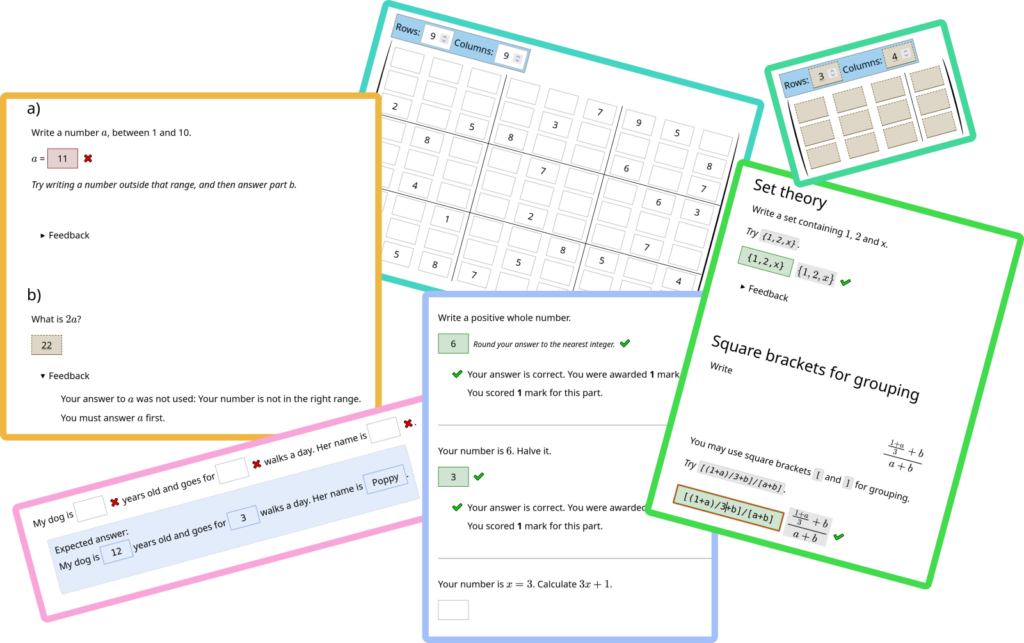
I’m pleased to announce the release of v10.0 of Numbas.
This release adds a new “notations” feature, making it easier to configure how mathematical expressions are interpreted and displayed. There are also several new options to make question parts more versatile, and some changes to avoid rounding errors in numbers.
I’ve put together a collection of question demonstrating the new features in this version. Read on for more detail about the changes in this release.
Numbas runtime
I’ve tagged v10.0 of the Numbas runtime on GitHub.
Notations
The JME parser has been abstracted to offer several different notations, each adapted for a particular purpose. This is designed to be extensible, so more notations can be added in the future.
Here are the built-in notations in v10:
- Standard: works the same way as the existing parser.
- Set theory: curly braces delimit sets instead of variable substitution, so
{1, 2, 3}is a set containing three objects. - Square brackets for grouping: square brackets are functionally equivalent to parentheses, so can be used to group terms. For example,
[(1+2)(3+4)] * 5is equivalent to((1+2)(3+4)) * 5. - Boolean logic: The symbols
+and*represent booleanORandAND, respectively. - Vector shorthand: parentheses delimit vectors and angle brackets denote a dot product. For example,
<(1,2), (3,4)>is equivalent todot(vector(1,2), vector(3,4))in the standard notation. - Real intervals: square brackets and parentheses delimit intervals of real numbers. A square bracket denotes a closed end, while a parenthesis denotes an open end. For example,
[1,2)is equivalent tointerval(1,2,true,false)in the standard notation.
See this in action in my JME notations demo question.
Asynchronous variable generation
The question variable generator has been changed to work asynchronously: if a defined variable returns a promise value, then the generator waits for the promise to resolve to a finished value before proceeding.
For example, this means that you can use the new fetch_text function to load data from a text file uploaded as a question resource, instead of putting the contents of the file in a variable definition. Or you could use the programming extension to run some Python or R code and use its results in your question variables.
There’s a new function then(promise, lambda) for conveniently using the results of asynchronous computations.
See this in action in my question which fetches data from an external API.
Restrict the functions students can use in mathematical expression parts
Previously, students could use any defined JME function in their answer to a mathematical expression part.
All of the JME functions are now grouped into function sets. You can pick which function sets to make available to the student, and refine further by allowing or forbidding individual functions.
You could use this to force a student to define one function in terms of others, for example $\cos(x)$ using only $\sin$, as in my example question.
Enhancements
- When there’s a penalty for showing steps, the student is asked to confirm before steps are shown. (issue)
- The
<numbas-exam>element has a ‘seed’ attribute, which controls the seed for the random number generator. The worksheet theme uses this to deterministically show exams with different seeds. (issue) - JME tokens can save information on their interactive state to suspend data. The JSXGraph extension uses this to more reliably reload interactive diagrams. (code)
- The latest version of the .exam file schema is always in
schema/exam_schema.json. It’s online at numbas.org.uk/schema/exam_schema.json. - The matrix answer input widget for custom part types has an option
prefilledCells, matching the existing option for matrix entry parts. (issue) - There is a new simplification rule,
collectIntegerFactors. (issue, documentation) - There’s an option to show the expected answer for gap-fills as a single block containing a duplicate of the whole prompt, instead of inline. (issue, documentation)
- There’s a new option in explore mode to show all parts at once. (issue, documentation)
- There’s a new option for the form of the interpreted answer produced by multiple response parts. (issue, documentation)
- The “your score won’t be affected” message next to the show steps button is only shown if the part is marked. (issue)
- The cells of a matrix entry part are styled based on correctness, if per-cell marking is turned on. (issue)
- There’s an option to add vertical and horizontal lines to matrix entry parts. There are some presets for fixed lines, or you can give an expression defining where lines should be drawn. (issue, documentation)
- You can define a condition for when a part’s answer can be used in adaptive marking. You could use this to reject trivial answers. (issue, documentation)
- The
integerandrationaldata types useBigIntvalues internally. This means that they can accurately represent any integer, limited only by your device’s available memory. This will be most notable when calculating values larger than 1016. (issue) - There’s a new
intervaldata type, representing a union of intervals of real numbers. (documentation) - The icons used for feedback (tick and cross in the English locale) are now localised strings, so other locales can use different symbols. (issue)
- You can now change the label on the “show steps” button. (code, issue)
- The JME syntax documentation now describes how unicode characters are normalised. (documentation)
Bug fixes
\varand\simplifyonly wrap the TeX in braces if it starts with a-or+character. (code)- Improved how the
\varand\simplifycommands use braces, to help with cases where they’re used for subscripts/superscripts. (issue) - Improved auto-submit on multiple response parts in Safari. (code)
- Question CSS is again scoped to just that question. (issue)
- The mathematical expression part copes with an empty answer and produces a sensible feedback message. (code)
apply_marking_scriptlooks up the chain of scopes to find the stateful one. (code)- When submitting gaps, they don’t store their answer until the parent part has finished submitting. (issue)
- The routine to expand juxtaposed names doesn’t add a break for a function whose name is empty. (code)
- Worksheet theme: fixed expected answers on answer sheets, and the “show sheet ID?” toggle. (issue)
- Fixed a code typo when advancing from the exam introduction. (code)
- Fixed MathJax’s stylesheets to work with the new
<numbas-exam>custom element. (issue) - After substituting in HTML which produces elements, variables are substituted into those elements too. (code)
- Fixed the width of the question container in the worksheet theme. (code)
- Fixed the display of available marks in the worksheet theme. (code)
- Fixed the routine that converts numbers from scientific notation. (code)
- William Haynes removed a duplicated line of CSS. (code)
- Fixed the display of the exam score and available marks in locales that use comma for the decimal separator. (code)
- The pre-submit tasks cache looks at replaced variables. (issue)
- Fixed loading a matrixentry part when the staged answer is undefined. (code)
- Matrix entry part: set the default staged answer to an empty matrix instead of undefined. (code)
- Mathematical expression part: the
formula_typenote copes with the type inference failing to infer a type. (code) - Fixed the display of dropdowns in print. (issue)
- Pattern-matching: improved how the
rationalannotation matches. (issue) - Gap-fills only cancel auto submission if clicking inside the gap, and some gaps are unanswered, so if you move on from a partially completed gap-fill it’s auto-submitted. (issue)
- Explore mode: all parts and their headers are shown in print. (issue)
- The routine to render an expression to a JME string preserves both the
latexandsafeflags on strings. (code) - Fixed the styling of warning boxes. (code)
- Improved the JME parser so it can parse extremely long strings. (issue)
- Feedback messages remember the scope they were produced in, so variable substitution into LaTeX works. (issue)
- The displayed score is updated even if the part/question is revealed. (issue)
- The correct answer box is not shown for extension parts, since it’s always empty. (code)
Extensions
- Codewords: the functions
random_wordandrandom_combinationare marked as random. (code) - GeoGebra: fixed a timing issue that meant linked parts were immediately marked as changed. (code)
- GeoGebra: fixed auto-submit on geogebra linked parts. (code)
- JSXGraph: updated JSXGraph to version 1.12.2. (code)
- JSXGraph: objects created from a JME dictionary have their ID set to the dictionary key. (code)
- JSXGraph: the diagram’s interactive state is saved and resumed using the new mechanism. (code)
- JSXGraph: fixed a bug to do with how checkboxes, buttons and inputs are rendered. (code)
- JSXGraph: Boards get deterministic IDs. (code)
- Programming: fixed a code typo: missing brackets after
slice. (code) - Programming: the placeholder isn’t stored as an answer on loading, but can be submitted without interacting with the editor. (issue)
- Programming: the editor indents by 4 spaces. (issue)
Constructive real numbers extension
I’ve written an extension which adds a “constructive real number” data type, and an associated notation which interprets literal numbers in expressions as constructive real numbers instead of the standard floating-point number type.
Constructive real numbers are guaranteed to be correct to any chosen precision. Digits of a calculated value are computed on demand, so you don’t have to choose a level of precision in advance.
You could use this when evaluating or comparing expressions which could accumulate a lot of floating-point error, such as very large exponentials.
Numbas editor
I’ve tagged v10.0 of the Numbas editor on GitHub.
Enhancements
- When running an exam or question through the editor, the Exam object is available in JavaScript as
Numbas.exam. This is really only helpful to developers, to inspect the exam while it’s running. (code) - The .exam upload form validates against the schema, to catch invalid files. (issue)
- You can add a query parameter
?themeto previews/compile URLs to force a particular theme. For example, add?theme=worksheetto use the printable worksheet theme. (code) - Fixed a bug affecting variable reference detection in case-sensitive mathematical expression parts. (issue)
- You can filter search results for ones using particular extensions, custom part types, and themes. (issue)
- Fixed a bug in the data export that left file handles open after exporting resources. (code)
- There’s a new management command
export_project. (code)
Bug fixes
- The variable groups box has a minimum height so doesn’t get squashed on very short viewports. (code)
- Custom functions with empty names aren’t added to the question scope. (code)
- Fixed the query for custom part types to show in the question editor when the user sees everything. (Only affects superusers) (code)
- Variables with no defined equality method are skipped over when deciding whether to regenerate parts for testing. (issue)
- The editor item access URLs are now displayed as proper links, to make them easier to copy. (code)
- Fixed a bug where an exam could accidentally miss an extension required by a custom part type. (issue)
Numbas LTI provider
I’ve tagged v4.5 of the Numbas LTI provider on GitHub.
Attempt analysis tool
I’ve written a new tool to help you look through the incorrect answers that students give to Numbas questions.
The attempt analysis tool is available on all resources in the LTI provider, accessed through a link on the Stats page. For each question part in the exam, it shows all incorrect answers, along with the expected answer for that attempt. You can work through these and tag them, to help identify common errors.
My colleague Shweta Sharma has used this tool to improve our engineering maths exam, finding cases where students could have been given partial marks and identifying poorly-worded questions.
Context summaries
You can now create “context summaries” showing the student a menu of resources available in the context, along with their progress.
You can choose which resources are included, what kind of feedback to show, and how to measure progress.
Extensions
We recently needed to add two bespoke pieces of functionality to our Numbas LTI server to support uses at Newcastle. Because the Numbas LTI provider uses the Django framework, this is fairly straightforward to achieve using Django’s apps, but I had to add a setting NUMBAS_EXTRA_APPS, giving the names of any extra apps you want to use. These are added to the Django INSTALLED_APPS setting, and their views are added to the router under the prefix /apps/<appname>/.
Enhancements
- There’s a new management command to load attempt data. (code)
- There’s a new management command
rewind_attempt, which (code) - Show LTI 1.3 registration error (code)
- Include URL patterns from apps specified in settings.NUMBAS_EXTRA_APPS (code)
Bug fixes
- Editor links cope with paginated data from the editor API. (code)
- The access change edit form keeps the usernames and email text fields in sync with the checkboxes. (issue)
- Fixed the “update existing attempts to use this version” on the replace exam form. (issue)
- Fixed a bug to do with linking LTI line items with Numbas resources, and Numbas no longer tries to set the start or end times of line items. (code)
- When updating an LTI 1.3 line item, the cache is updated first. (code)
- Fixed the ready-made exam search. (issue)
- Fixed a typo so that the configured LTI 1.3 instructor roles are used. (code)
- Fixed a code typo in resource_remark.js. (code)
- Remarked SCORM elements are included when finding changes after re-marking. (issue)
- Scores in the attempts table are shown to 3 decimal places. (issue)
- Some small CSS changes. (code)
- Public keys from the LTI platform are cached, to avoid repeat requests. (issue)
- The requests-cache package is used, so requests for static objects such as platform keys aren’t repeated. (code)
- The tasks that have to run after SCORM elements are received are now more robust, so one task failing doesn’t prevent the rest from running. (code)
- Fixed re-marking of questions with pre-submit tasks, for all Numbas versions. (code)
- Docker: fixed the postgres healthcheck, and made the other containers wait for it before starting. (code)